

Description
Download SWF Player APK – Flash Player, SWF Viewer, Android App, Free Tool
Overview
The SWF Player APK is a dedicated Android application developed by BIT LABS LLC, designed to enable users to play Flash files (SWF format) directly from their device’s storage. This tool serves as a straightforward solution for accessing legacy Flash content without requiring root access, additional hardware, or external devices. The primary purpose of the app is to provide a simple playback environment for SWF files, which are increasingly difficult to view due to the discontinuation of Adobe Flash Player across most platforms. It is particularly useful for users who still maintain Flash-based educational materials, games, or multimedia presentations on their Android devices.
Target users include students, educators, and casual users who may have archived Flash content on SD cards or internal storage. The app supports direct file access from the device’s storage, allowing for immediate playback without conversion or complex setup. While the developer did not provide additional details about the company’s background, the app’s design reflects a focus on minimalism and functionality. Real-world usage scenarios include viewing educational animations, playing classic Flash games, or reviewing archived digital content in offline environments.
Key Features & Capabilities
- Direct SWF File Playback – The app allows users to open and play SWF files directly from the device’s SD card or internal storage, eliminating the need for conversion or external tools.
- No Root Required – Users can access and play Flash content without modifying system files or requiring root privileges, making it accessible to all Android users.
- Offline Functionality – The player operates entirely offline, enabling playback without an internet connection, which is ideal for educational or remote settings.
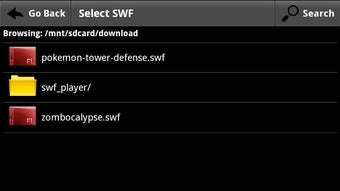
- Minimalist Interface – The app features a simple, user-friendly interface focused solely on file selection and playback, reducing complexity for casual users.
- Free to Use – The application is available at no cost, with no subscription fees, in-app purchases, or advertisements disclosed in the provided information.
These features make the app suitable for quick access to Flash content. For example, a teacher can play a Flash-based lesson on a tablet during a classroom session, or a student can review an interactive tutorial stored as an SWF file. The lack of additional dependencies ensures a streamlined experience, especially for users unfamiliar with technical software setup.
User Interface, Workflow & Performance
The user interface of SWF Player APK is designed with simplicity in mind, featuring a clean layout focused on file selection and playback controls. Navigation is intuitive, allowing users to browse their device’s storage, locate the desired SWF file, and initiate playback with minimal steps. The workflow is efficient, requiring only two actions: open the app and select the file. There are no setup wizards, configuration screens, or permission prompts mentioned in the provided information, suggesting a plug-and-play experience.
Performance details were not specified by the developer. However, based on general behavior of lightweight Android applications, the app likely maintains low resource usage during playback. The developer did not provide information on CPU or RAM consumption, nor did they specify any stability concerns. Users can expect consistent playback for standard SWF files, though performance may vary depending on the complexity of the content and the device’s hardware. The app does not include advanced features like playback speed control, fullscreen toggle, or audio adjustment, which may affect user experience for more demanding use cases.
Compatibility & System Requirements
SWF Player APK is designed for Android devices, though the specific version requirements were not provided. The application is distributed as an APK file, indicating it is intended for installation on Android smartphones and tablets. The installation size was not disclosed, so exact storage requirements remain unknown. Compatibility information is limited to the platform, with no mention of specific device models, screen resolutions, or processor architectures.
The developer did not specify exact system requirements, including minimum RAM, storage space, or Android version. As such, users should exercise caution when installing on older or low-end devices. Performance may vary depending on the device’s hardware and Android version. The app does not require root access, which increases its compatibility across a wide range of devices, including those with locked-down system configurations.
Pros and Cons
Pros
- Free to use with no in-app purchases or ads
- Supports direct playback of SWF files from device storage
- Does not require root access or additional hardware
- Operates offline, ideal for educational or remote use
- Simple, lightweight interface with minimal learning curve
Cons
- No advanced playback controls (e.g., speed, fullscreen)
- Exact system requirements not disclosed
- Limited to SWF file format, no support for other multimedia types
- No audio or video export options
- Performance details not provided by the developer
FAQ Section
Is SWF Player APK safe to download and install?
The app is distributed as a standard APK file and is developed by BIT LABS LLC. As with any third-party app, users should ensure they download it from a trusted source to avoid potential security risks. No malware or security issues were mentioned in the provided information.
Does SWF Player require an internet connection?
No, the app operates entirely offline. Once a SWF file is selected, it can be played without any internet connection, making it suitable for use in environments with limited or no connectivity.
Can I use SWF Player on older Android devices?
Compatibility with older Android versions was not specified. However, since the app does not require root access and is designed as a lightweight tool, it may function on devices with older Android versions, though performance may vary.
Is the app free to use?
Yes, the app is completely free to download and use. There are no subscription fees, in-app purchases, or advertisements reported in the provided details.
Does SWF Player support other file formats besides SWF?
No, the app is specifically designed for SWF files. There is no indication that it supports other multimedia formats such as FLV, MP4, or AVI.
Final Thoughts
SWF Player APK offers a practical and accessible solution for users who need to play Flash content on Android devices. Its minimal design, lack of required permissions, and offline functionality make it a reliable choice for educators, students, and casual users managing legacy digital assets. While it lacks advanced features and detailed system specifications, its core purpose is fulfilled efficiently. For anyone seeking a no-frills way to view SWF files without rooting or additional tools, this app delivers on its promise. The absence of cost and complexity further strengthens its appeal.
Download SWF Player APK now to enjoy Flash content on your Android device with ease.
Guides & Tutorials for SWF Player APK
How to install SWF Player APK
- Click the Preview / Download button above.
- Once redirected, accept the terms and click Install.
- Wait for the SWF Player APK download to finish on your device.
How to use SWF Player APK
This software is primarily used for its core features described above. Open the app after installation to explore its capabilities.
User Reviews for SWF Player APK 0
No reviews found





